
Offline STEP Review
PartLens Free STEP Viewer for Android
A free STP and STEP viewer for Android devices, built for shop-floor, vendor, QA, and engineering review.
Open CAD files locally, inspect loaded assemblies, cut sections, and measure what matters without upload, login, ads, or a full CAD workstation.
Why It Matters
A quick STEP check should not need a full CAD setup.
PartLens is for the moment when someone needs to open a `.step` or `.stp` file, rotate the model, check a feature, and keep the discussion moving.
It is intentionally focused: offline viewing, local files, assembly inspection, sections, and measurements that are labelled honestly when the geometry is approximate.
Android CAD Viewer
Open STEP and STP files where the work is happening.
PartLens helps people review CAD files away from the CAD desk: beside a VMC, at an inspection table, during a vendor call, or while checking a received part file.
- Open STEP/STP files locally on Android phones and tablets
- Inspect parts and assemblies without uploading customer files
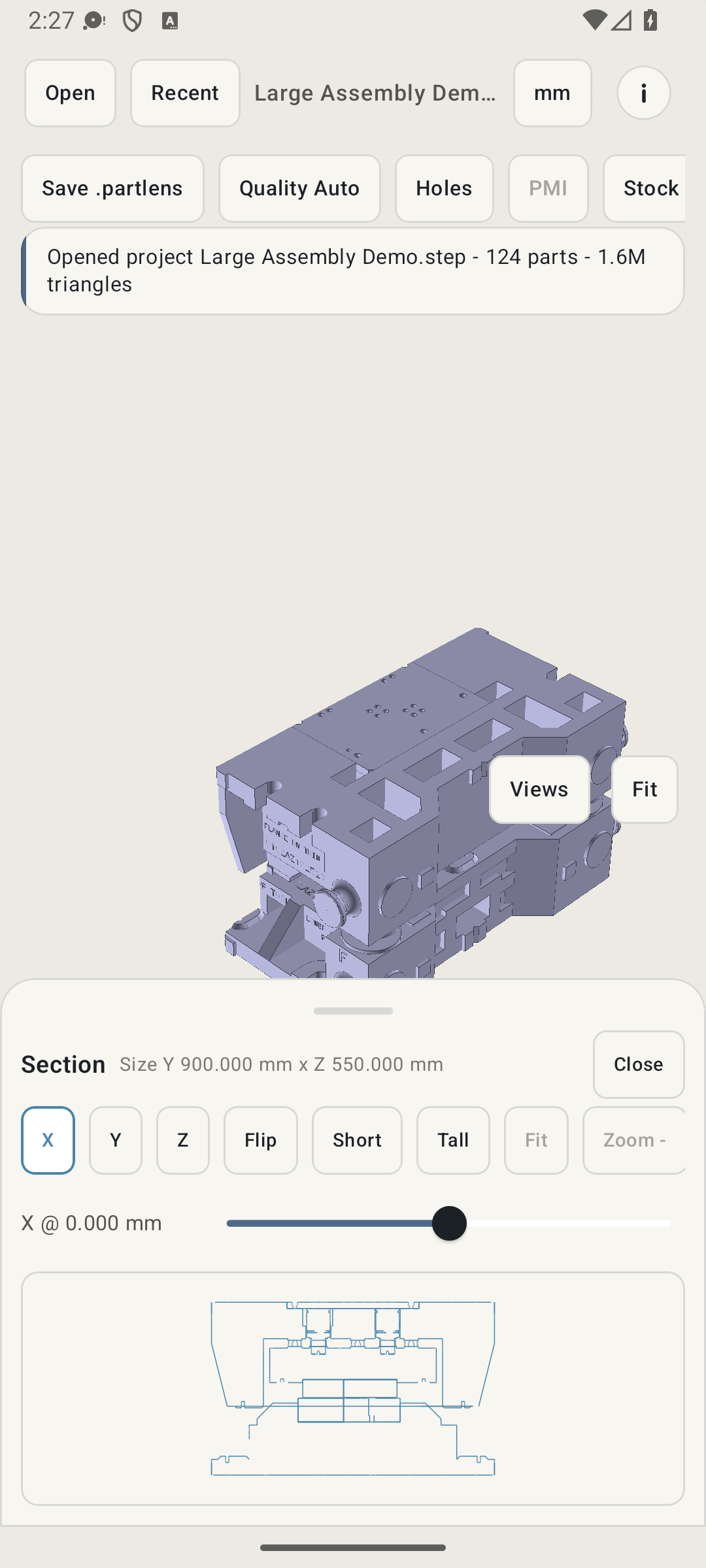
- Use section views to look inside loaded models
- Measure holes, faces, edges, and points during quick reviews
- Use recent files and PartLens-ready caches for faster repeat checks
Windows Helper
PartLens Converter
For larger assemblies, the Windows converter prepares a PartLens-ready cache before you move the job to Android. Use it when a heavy STEP/STP file needs faster opening or repeat review on a phone or tablet.
How To Use It
Prepare a heavy file, then review it on Android.
- Install the converter on Windows. Download the setup file and run it on the workstation that handles your CAD files.
- Add STEP or STP files. Queue one file or a folder of files that you want to review in PartLens.
- Convert to a PartLens-ready cache. The converter prepares visual data and measurement-ready support files for faster mobile review.
- Move the result to Android. Copy the converted output to the phone or tablet, then open it in PartLens for inspection, sections, and measurements.
Search Terms, Real Use
For people searching "free STEP viewer" or "free STP viewer" on Android.
PartLens is not trying to replace CATIA, NX, SolidWorks, or a full CAD workstation. It is a practical Android CAD viewer for fast offline review when a STEP or STP file needs to be understood quickly.
- No upload: files stay on the device or workstation you control
- No login: useful for vendors, QA, operators, and engineers
- No ads: the review surface stays focused on the model
- No CAD seat required for a basic inspect-and-measure discussion
Where It Fits
PartLens makes part review easier to carry into daily work.
Stratos handles toolroom status. CADMation NXT handles the engineering package. CADMation Mobile carries richer job details. PartLens solves a smaller, common problem: quick offline STEP review on a phone.